Bulk Delete Pages
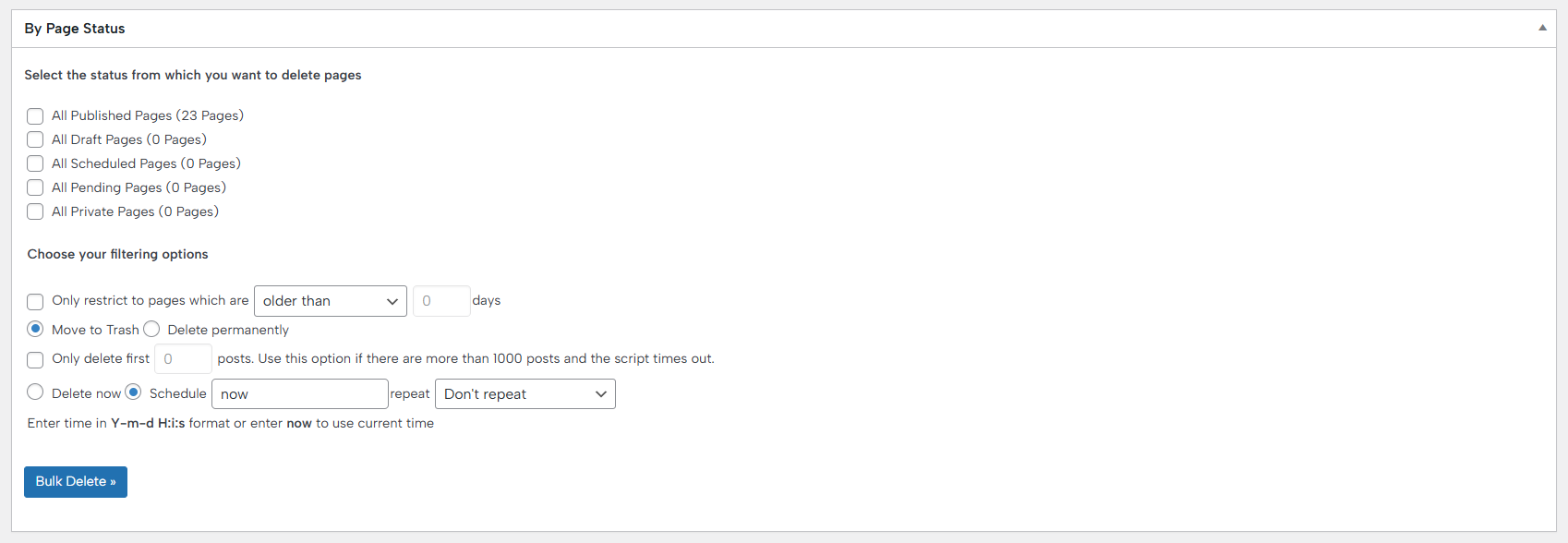
This feature is a powerful one that allows you to remove WordPress pages in bulk with full control and precision. It lets you choose exactly which pages to delete based on their status, including published, draft, scheduled, pending, or even private pages.
To avoid accidental deletions, the plugin offers flexible filtering options. You can restrict deletions to pages that are older than a specific number of days or only those published within the last X days. You can also decide whether pages should be moved to the Trash or deleted permanently, and even limit the action to only the first X pages that match your criteria.
For maximum flexibility, Bulk Delete Pages allows you to delete pages immediately or schedule the deletion for a future date and time. This makes it ideal for planned cleanups, maintenance tasks, or automated content management workflows.
Documentation didn’t help? Contact support!
Customers with a valid PRO license can reach out to our support either through the plugin’s built-in contact form or the general contact form. If using the general form, be sure to include your license key, or contact us using the email address associated with your purchase to help us assist you faster.
Using the free version? We have you covered too. Head over to the forums. First look at older threads and if you don’t find anything useful, open a new thread. Support is community-powered so it can take some time to get an answer.